To be direct the answer is disable Samsung FAST START program.
Samsung’s own software overrides Windows 7 POWER OPTIONS settings and greys out several options, including:
- REQUIRE A PASSWORD ON WAKEUP
- POWER BUTTON AND LID
- LID CLOSE ACTIONS
- POWER BUTTON ACTIONS
- SLEEP BUTTON ACTION
FAST START is enabled by default and it claims to ‘enable’ the laptop to enter sleep mode whatever the power settings. In fact it forces sleep mode by hard setting all the power-off options except the standard ones on the Start menu. Disabling FAST START it released the options.
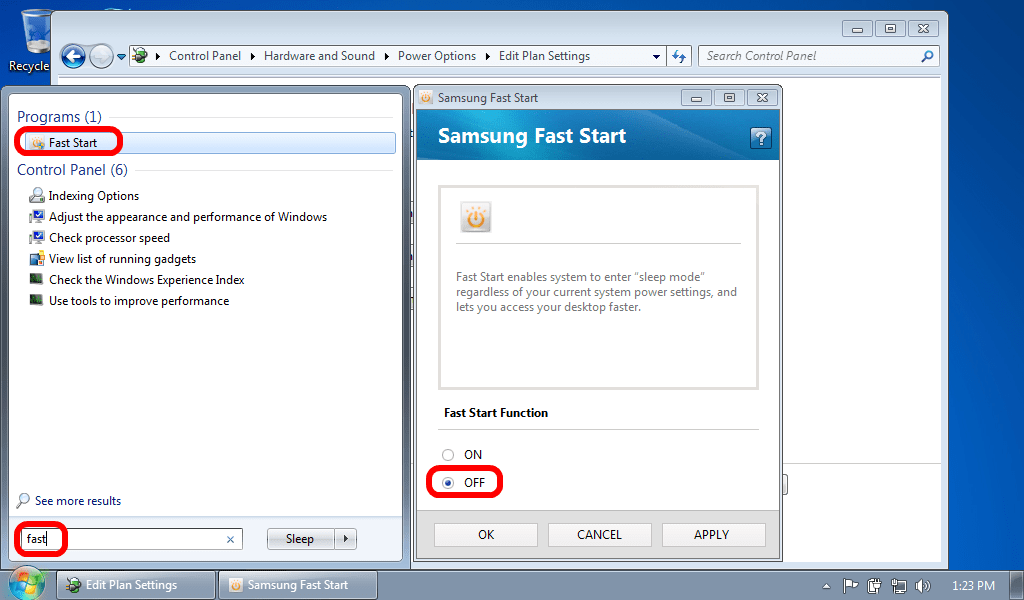
To disable FAST START, follow these simple steps
- click the START BUTTON
- type FAST into the search bar
- click FAST START when it appears
- click YES on the User Access Control window, if prompted
- click DISABLE on SAMSUNG FAST START
- Have a nice day
Disable Samsung Fast Start to Enable Greyed Out Windows Power Options

29 Comments
Tim · November 14, 2015 at 4:03 am
http://support-us.samsung.com/cyber/popup/iframe/pop_troubleshooting_fr.jsp?modelname=NP900X3A&idx=349620&modelcode=&
explains how to disable Fast Start via the Control Center (Fn+F1)
Mike · July 20, 2015 at 11:34 pm
I don’t understand why Samsung doesn’t post this. It just doesn’t make sense. Is Samsung this pre-occupied with its software that it doesn’t care that there are techies out there that need this type of info? Thanks for a great post. Have a great day. I know it’s 2015, but I just got this laptop.
maia · September 1, 2014 at 3:47 pm
fast start worked cheers
N4RPS · October 2, 2013 at 12:34 pm
Thanks for the tip! ^*@%$%$ Samsung and their ‘improvements’…
NS310 Mini LapTop · May 1, 2013 at 5:09 am
I have this problem with a Samsung NS310 mini laptop. Here I can’t run the “fast start”. I can’t find it under the Samsung program folders as a executable either. There is a faststart xml file under a folder named “Easy Display Manager” – but no executable files seems to be possible to run to get the “Easy Settings”.
The Laptop runs windows starter 7.
Any idea ?
Ian Matthews · May 2, 2013 at 5:51 pm
If you cannot find it, I would try to download it from the Samsung support site or third party sites like http://www.softpedia.com/progDownload/Samsung-Fast-Start-Download-186269.html
I hope this helps.
Tiago · November 19, 2012 at 9:35 am
I’ve tried for several times pushing Fn + F1 without succes…
I cannot change my power settings in a Serie 9 Samsung Laptop, any idea?
Regards!
Ian Matthews · November 20, 2012 at 11:53 pm
Have you DISABLED Samsung Fast Start?
Alex · October 11, 2012 at 12:05 pm
Great suggestion!!!
I’ve got a Samsung RC530 with the same problem…
…Solved in less than one minute!!! Thank you!
And now the “hibernate” option is finally available!
Thanks!