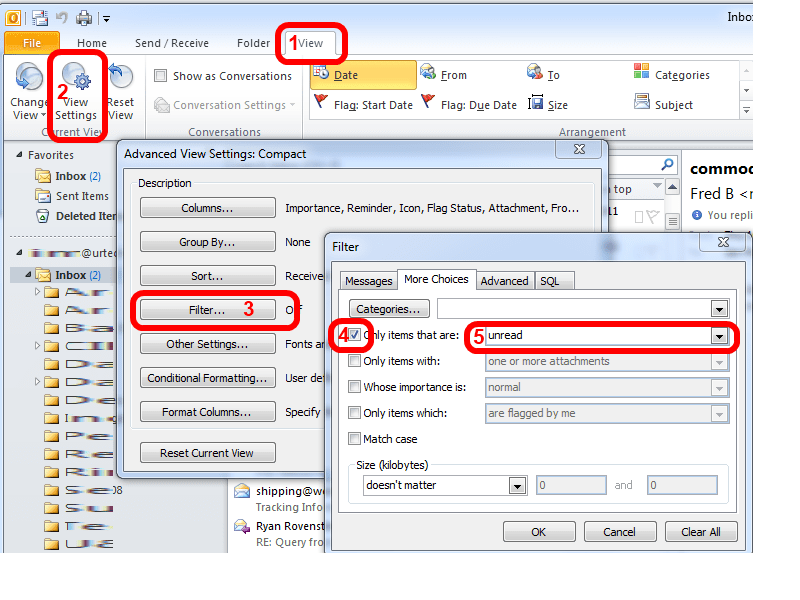
To avoid a major rant, let me just say that I can not think of a single good reason for Microsoft to remove the VIEW, UNREAD MESSAGES option that has existed in Outlook 2000 and 2003. To the point, if you want to view your unread messages in Outlook 2010 simply:
- Click the VIEW tab in Outlook 2010
- Click the VIEW SETTINGS button
- Click the FILTER button
- Check the ONLY ITEMS THAT ARE box
- Select UNREAD from the drop down list.
Now, wasn’t that easy!?!
Outlook 2010 How to View Unread Messages

18 Comments
Chozharajan · January 19, 2018 at 1:15 am
super. Its works
Teri Bitler · October 29, 2014 at 7:55 am
Thank you, thank you, thank you!!! Amazing that I couldn’t find this solution from Microsoft, but this is exactly what I was looking for!
Debby Ashton · December 19, 2013 at 9:11 am
Click on one account’s inbox. In the upper right you’ll see a bar with the magnifying glass. In this box type “read:no” and you’ll get ALL the UNREAD messages from ALL the accounts. Merry Christmas 2013!
marianne · January 13, 2013 at 11:53 pm
I am so frustrated with Outlook 2010. First I was getting duplicated messages from two years ago. I archived those and that stopped. Now however, all my new messages are going into my RSS feeds. This is after they were going to my search unread messages folder.
How do I get all unread and read messages to stay in my Inbox until I transfer them to sub folders? HELP PLEASE!
Ian Matthews · January 14, 2013 at 1:05 pm
Hi Maraine;
That is a problem I have only seen once before and it was caused by a user creating RULES which was easy to resolve:
Note that I am running Outlook 2013 now so to answer your question I am using Outlook 2007 which will be very similar to Outlook 2010.
1: TOOLS > ORGANIZE
2: Click RULES AND ALERTS from the top right
3: That will show you all of your existing rules which hopefully has the offending one jump out at you
Note that very few people use rule in my experience; somewhere around 5% I would guess so if you have no rules, don’t be shocked… it just means this was not your issue.
Let me know what you find
Dwayne K · February 27, 2013 at 9:28 am
I recently switched from Outlook 2010 to 2013, when I purchased my Surface Pro. In Outlook 2010 my Unread Mail folder that I set up under Favorites used to display email from both my personal gmail and company Exchange mail accounts. However, using 2013, I seem unable to set up the Unread Mail folder to display unread messages from both accounts. Any ideas?
Thanks.
Ian Matthews · March 17, 2013 at 9:46 am
Yes, I THINK I know this one. The problem is that you are using TWO message stores, one Exchange and one .PST which the UNREAD tab in Outlook 2013 does not support (I THINK). I found the following which might help you:
Add a predefined Search Folder
1.In Mail, on the Folder tab, in the New group, click New Search Folder.
Keyboard shortcut To create a Search Folder, click CTRL+SHIFT+P.
1.From the Select a Search Folder list, click the Search Folder you want to add.
2.If prompted, under Customize Search Folder, specify the search criteria to use.
3.To select a different mailbox to search, under Customize Search Folder, click the arrow at the Search mail in box, and then select the mailbox from the list.
Tip To change the criteria for a Search Folder, right-click the folder in the Navigation Pane, click Customize this Search Folder, click Criteria, and then change the criteria. The criteria of Search Folders in the Reading Mail group, such as Inbox, Drafts or Sent Items, can’t be changed.
http://superuser.com/questions/187771/ms-outlook-2010-shared-unread-mail-for-multiple-email-accounts
nealbscott · December 18, 2012 at 1:04 pm
You can also just use the ‘search folders’ Theres one for Unread Mail.
syam · February 18, 2013 at 7:33 am
Thanks nealbscott ! I also saw that I can right click and add the “Unread mail” search folder to my favorites.
pawan · November 7, 2012 at 2:09 am
thanks
Sandy · October 31, 2012 at 1:04 pm
I am bookmarking this site. I have been trying to figure that out for quite some time. LOL
John Osmond · October 22, 2012 at 10:31 am
Thank you!
Kevin · August 2, 2012 at 1:29 pm
Thanks!
Rojo Don Poho · July 13, 2012 at 9:15 am
Or try this one simple step:
type read:no in the search box
Ian Matthews · June 25, 2012 at 11:00 pm
AHHHHHHHHHHHHHHH I missed the word FILTER in his message, this makes sense.
I can tell you that I spent about 30 minutes working through this over a few days and did not find a single useful blog or kbase article which explained it.
Thanks!
Brundlfly · June 21, 2012 at 3:48 am
Actually, David is correct.
– ‘Home’ ribbon
– ‘Find’ box
– ‘Filter E-mail’ drop-down menu
– Click on ‘Unread’
Then when you want to un-filter just click on the ‘Close Search’ button
hope this helps
cheers
Brund
David Gerler · June 11, 2012 at 4:18 pm
Even easy is on the ‘Home’ tab all the way to the right is a filter button. Click it and select ‘Unread’
Ian Matthews · June 11, 2012 at 7:19 pm
Good Day David; In 2010 the UNREAD/READ button only marks the current message as READ or UNREAD; it does not set a filter to only view the UNREAD items.
If you have any other ideas on the topic, I would love to hear them. Thanks for the comments.