URTech Mouse logo-dark-80
  • Home
  • How To’s
    • Windows 11 & Windows 10Windows 2000, XP, Vista, 7 and more How Tos
    • Windows Serverwindows 2003, 2008, R2 how tos
    • Microsoft 365, Azure & HostingHelp with Office 365 Issues
    • Office: Word, Excel, Outlook…Office Apps like Word, Excel, Visio, Outlook, Project, Powerpoint, 2003, 2007 and 2010
    • Mobile: Android, Samsung, LGBlackberry, BES, and BIS news and how tos
    • Microsoft Exchange ServerExchange 2003, 2007, 2010 how to and demos
    • System CenterEndpoint Protection
    • JokesThis category is for I.T. relates gags and practical jokes
    • Product Reviews & Other TechnologiesOther Technologies like firewalls, VoIP, Skype, Hardware Comparisons and other how tos
  • Windows 10, 11 & Server
    • Windows 11 & Windows 10Windows 2000, XP, Vista, 7, Windows 8 and more How Tos
    • Windows Serverwindows 2003, 2008, R2 how tos
  • Office 365 & Azure
    • 25 User FREE Office 365 Trial
    • Office365 & Azure HelpHelp with Office 365 Issues
  • IT Business News
  • YouTube Channel
  • Contact
    • Discount Hosting
    • On Site SupportHARDWARE & SOFTWARE We have found that most customers are tired of the excuses from ICT vendors… “… it’s the softwares fault” “…it’s Dell’s fault”. Fault is not important when you are having problems… getting it fixed is. We typically take end to end responsibily for anything that plugs into the wall, from desktops and laptops, to photocopiers and phone systems… it’s all our problem. Server hardware Server Software (like Exchange, Server 2008, Print Sharing, Sharepoint, Dynamics…) Desktops (from any vendor, IBM/Lenovo, Dell, Toshiba, White box…) Laptops Switches and Firewalls (from any vendor, like Dlink, Cisco, Linksys, FortiNet, Netgear…) Uninteruptable Power Supplies (UPS) network, phone and electrical cabling land line systems (like Nortel, Avaya and Toshiba) photocopiers (like Xerox, Kyocera, Mita, Canon, Toshiba…) cell phones Blackberry’s Blackberry Enterprise Server and even the Apple Mac’s… we handle it all CONTRACT MANAGEMENT & NEGOTIATIONS Many companies simply take the “rack rate” on their purchases and leases.  We are skilled and experienced at managing and renegotiating all sorts of contracts.  Cell contracts will Telus, Bell, Rogers… are often Service contracts with photocopy companies Land Line contracts with Bell, Telus, Rogers, All-stream Evergreen renewals and sooo much more We can reduce your costs and increase…
    • Computer Recycling
    • Hardware & SoftwareNEW HARDWARE & SOFTWARE We sell and support all of the ‘Tier 1′ and ‘Tier 2′ brands. Toshiba, HP, Dell, Samsung, Logitech, Lenovo, Intel, AMD, Colubris, AOC, Kingston, Microsoft, Symantec, Kaspersky, McAfee and on and on…                                                                                                                                                                                                      HARDWARE REPAIR AND UPGRADE We will support, repair, and upgrade hardware from any brand or manufacturer.  From Dell to Toshiba, to Lenovo/IBM we service it all.  Up & Running will also perform a security wipe and dispose of your old hardware, networking equipment and software to all firms in the Calgary Region. DATA RECOVERY Our qualified technicians provide full data recovery from failed or deleted hard drives and memory sticks for anyone in Southern Alberta.
    • Privacy Policy

defender

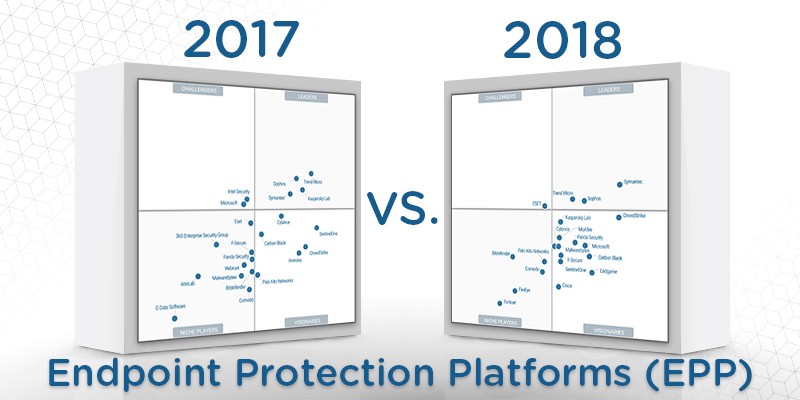
gartner-epp-comparison

SOLVED: How To Evaluate AntiVirus and Next Gen Malware Defense EndPoint Protection Products

If you work in IT, it is only a matter of time before you will be involved in a group trying to figure out which EPP (Endpoint Protection Product) security software to buy. The trend today is to get away from signature based AntiVirus which is great at stopping last Read more

By Ian Matthews, 7 years ago August 8, 2018

SOLVED: How To Enable BLOCK AT FIRST SITE in Windows Defender SCEP Using SCCM or GPO in Windows 10 1607

If you have deployed Windows 10 Anniversary 1607 and are using Windows Defender you should be very interested in the new BLOCK ON FIRST SIGHT feature.  When a user runs a program that Defender has never seen before, BLOCK ON FIRST SIGHT, sends a metadata about the file to a Microsoft cloud service.  Read more

By Ian Matthews, 9 years ago August 9, 2016

SOLVED: How to Make Windows Defender to Update Automatically

There are two ways to set Windows Defender (Security Essentials) to automatically update and the first is to set WINDOWS UPDATE to automatically install all updates.  The other way is to create a new SCHEDULED TASK: Click START and type TASK and then click on TASK SCHEDULER Right click on TASK Read more

By Ian Matthews, 11 years ago August 12, 2014

SOLVED: Windows 8 Release Preview Has No Antivirus!

Um, yes it does!  Win8 Defender now includes Security Essentials.   Here is the official word direct from Microsoft “Windows 8 Release Preview comes with Windows Defender, which has been improved in Windows 8 to provide the same level of malware protection as Microsoft Security Essentials. You do not need to Read more

By Ian Matthews, 13 years ago May 31, 2012
RankMath Advert Best Price6
i-stand-with-ukraine-donate-now5
RankMath Advert Best Price6
USEFUL LINKS:
Guide to Creating a Blog
Who Invented the Personal Computer?
Guide to Making a Website
Whats Next in Electric Vehicles?
Guide to the Best Website Builders
  • Calgary Computer Recycling
  • Privacy Policy
  • Who We Are
  • On Site Support
  • Hardware & Software Services
  • Office 365 & Hosted Services
  • Contact
Written Permission Required For Use of Any Materials or Text - Powered by URTech.ca